How to setup togglable overlays in AV1 streams
Overview
This guide explains how to integrate and utilize the togglable overlays feature in AV1 video streams from Axis cameras. Togglable overlays enable viewers to seamlessly switch between viewing a scene with or without overlays and reducing bandwidth and storage by combining both views into a single stream with multiple encoded tracks.
Description of togglable overlays
Togglable overlays enable the integration of various graphical overlays such as text, images, widgets, scene annotations, bounding boxes, and MQTT overlays into a video stream. This feature allows users to view the scene with or without overlays in both live view and playback, removing the need for separate streams.
How do I know if togglable overlays is supported on the device?
Generally, all ARTPEC-9 video devices that run Axis OS 12.7 or later supports this feature, but in terms of integration, you can check param.cgi to understand if it is supported and enabled. In this case Image.I0.Layers is the parameter that you are looking for.
You can find this here:
http://<servername>/axis-cgi/param.cgi?action=listdefinitions&listformat=xmlschema&group=Image.I0.Layers
The expected response if togglable overlays is supported is:
<group name="root">
    <group name="Image">
        <group name="I0">
            <group name="Layers">
                <parameter name="Enabled" value="no" securityLevel="7744" niceName="Enabled">
                    <type>
                        <bool true="yes" false="no" />
                    </type>
                </parameter>
            </group>
        </group>
    </group>
</group>
- Overlay control: The
overlaysparameter in conjunction withvideolayersdetermines which overlays are visible. Options include"text","image","application","all", and"off". - Persistent overlays: Privacy masks, AXIS Live Privacy Shield masks, or Picture-in-picture overlays are always applied to both streams.
Limitations
- Codec limitation: Only compatible with the AV1 codec on ARTPEC-9 video devices.
- Performance impact: Increased bitrate and decoding load compared to a single stream.
- Resource usage: Video processing requires 2x resources, potentially limiting the camera's maximum throughput.
- Multi-view streams: Not currently compatible with multi-view streams.
- Resolution & FPS behavior: Togglable overlays support the same resolutions as normal streams, but the maximum FPS depends on available camera resources and cannot exceed sensor limits. Typically, performance matches the average FPS of two equivalent streams.
VAPIX integration
To activate togglable overlays, set the videolayers parameter to 1 in the VAPIX URL when using the AV1 codec:
"videocodec=av1&videolayers=1"
AV1 overlay selection on client side
Overview
The AV1 Metadata OBU (Open Bitstream Unit) is included at the beginning of the GOP (Group of Pictures) within the Temporal Unit, which contains the keyframe (I-frame). This specification defines which data structure in the AV1 stream that should identify and modify “togglable overlays” streams.
Purpose
- Identify a togglable overlays stream.
- Modify the stream to show only the base layer or the overlay layer.
General OBU stream structure
Each GOP of a togglable overlays stream starts with a Temporal Unit containing a KEY FRAME and an INTER FRAME. Subsequent Temporal Units contain two INTER FRAMEs marked as "not shown," followed by a Frame Header that determines which frame is displayed.
Metadata format
The OBU_META_DATA is defined to start with an ID (25) for "unregistered user private" data. The payload begins with a 16-byte UUID, with the last byte indicating the version. The UUID for togglable overlays is "aaaaaaaa-aaaa-aaaa-aaaa-70661eab1e02". Note that the same OBU_META_DATA ID (25) is used for other functionalities such as SignedVideo™ and F-Frames, but the UUID differentiates the specific use case.
Tag definitions
| Tag ID | Name | Content | Description |
|---|---|---|---|
| 0 | LAYER_INFO | 1 byte + 1 byte per layer | The first byte contains two 4-bit nibbles. Higher nibble (MSB): Layer number (zero-based) currently shown (SHOWN). Lower nibble: Number of layers present (NBR_LAYERS), defining the array size in bytes following the first byte. Example: 0x02 indicates base layer shown (0), two layers total, with two bytes following. Verification: - SHOWN < NBR_LAYERS - 0 < NBR_LAYERS < 7 - TLV length == 1 + NBR_LAYERS Layer Contents: - 0x00: Forensic image (plain camera image without overlays, privacy masks may have been applied) - 0x01: Image with overlays - 0x02-0xff: Reserved |
| 1 | KEY_TU_X_LAYER_FH | OBU_FRAME_HEADER | Replacement FRAME_HEADER for layers other than the base layer. Substitutes the current KEY FRAME OBU_FRAME_HEADER to hide the KEY FRAME. Full OBU include header, length fields and payload. Present only if the stream is showing the base layer (LAYER_INFO, first byte high nibble == 0). |
| 2 | KEY_TU_BASE_LAYER_FH | OBU_FRAME_HEADER | Replacement FRAME_HEADER for the base layer. Substitutes the current KEY FRAME OBU_FRAME_HEADER to show the KEY FRAME. Full OBU include header, length fields and payload. Present only if the stream is showing a layer other than the base layer (LAYER_INFO, first byte high nibble != 0). |
| 10 | SHOW_BASE_LAYER_FH | OBU_FRAME_HEADER | Replacement header for INTER Temporal Units to display the base layer (0). Full OBU include header, length fields and payload. Length for this OBU is generally only a byte, resulting in a Tag length of (usually) 3 bytes. Contents match the last OBU_FRAME_HEADER in non-key-frame TUs when the base layer is shown. |
| 11 | SHOW_LAYER_1_FH | OBU_FRAME_HEADER | Replacement header for KEY/INTER Temporal Units to display layer 1 instead of the base layer. Full OBU include header, length fields and payload. Length for this OBU is usually only a byte, resulting in a Tag length of (usually) 3 bytes. |
| 12-17 | SHOW_LAYER_x_FH | OBU_FRAME_HEADER | Future extension to show more layers if applicable |
| 30 | LAYER_DEPENDENCIES | 1 byte per layer | Future extension to define which layers need to be retained to display a specific layer. Details to be discussed and finalized. |
Modifications of the stream
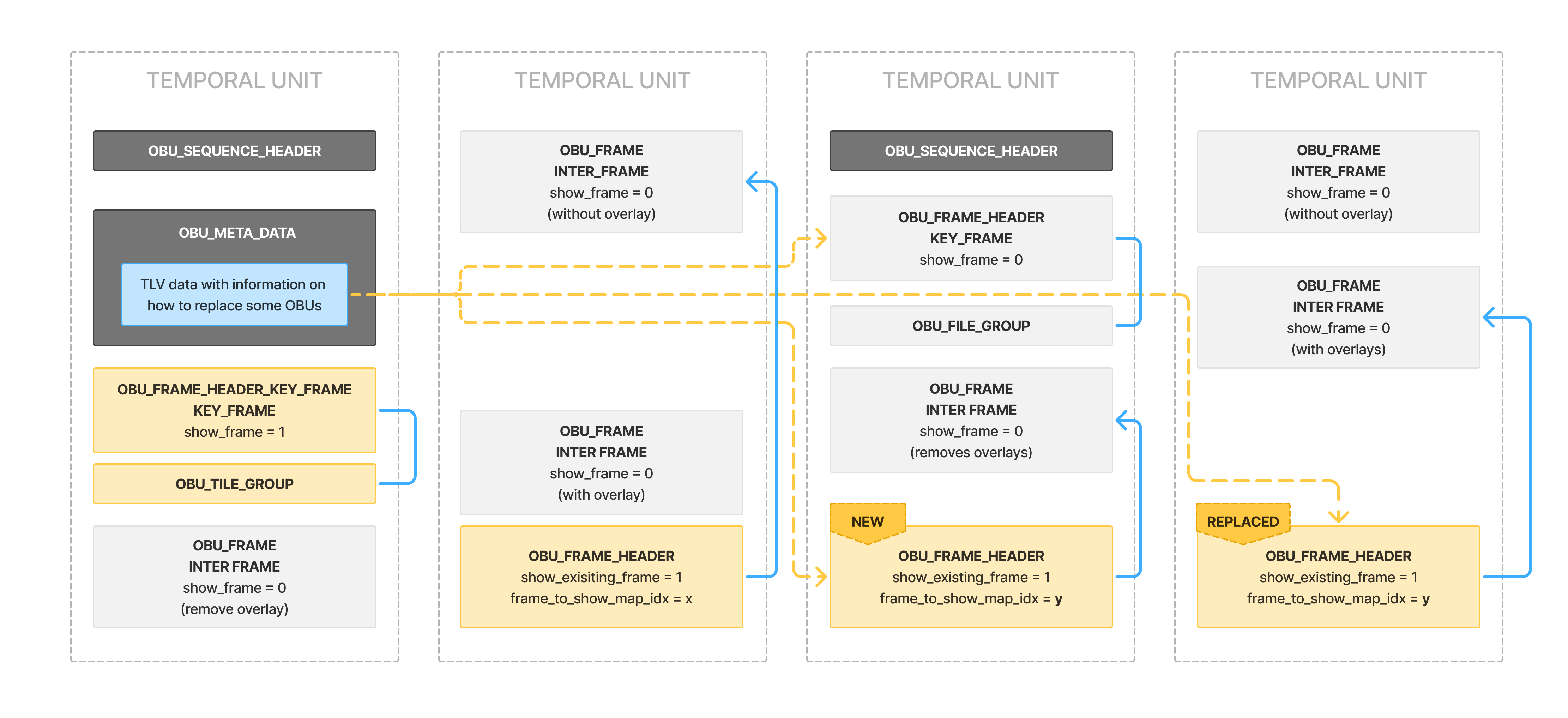
Base layer only
-
Identify that the stream starts with a KEY FRAME (e.g., via the presence of OBU_SEQUENCE_HEADER).
-
Identify that the stream contains the OBU_META_DATA in the first TU with the right ID and UUID for a Togglable Overlay stream.
-
Drop this OBU_META_DATA in the first TU of a GOP.
-
Drop the first OBU_FRAME in each TU of a GOP. Subsequent TUs within the same GOP should drop all OBU_FRAMEs. Alternatively, drop any OBU_FRAMEs whose count exceeds 1 to to maintain a counter for OBU_FRAMEs and OBU_TITLE_GROUPs.
Additional layer only
This should be done for each GOP:
-
Identify that the stream/GOP starts with a KEY FRAME (e.g., via the presence of OBU_SEQUENCE_HEADER). This indicates the start of a new GOP. Previously stored TLV information should be discarded as the contents may change between GOPs.
-
Identify that the GOP contains the OBU_META_DATA in the first TU with the right ID and UUID for a togglable overlays stream.
-
For each GOP, find and store the TLVs for KEY_TU_X_LAYER_FH and SHOW_LAYER_1_FH from the OBU_META_DATA.
-
For the first TU in the GOP (and all other TUs that contain KEY FRAMEs):
-
Replace the OBU_FRAME_HEADER with the contents of KEY_TU_X_LAYER_FH.
-
Add the OBU_FRAME_HEADER stored in SHOW_LAYER_1_FH at the end (before the next temporal delimiter).
-
-
For all following TUs that are not KEY FRAMEs:
- Find and replace the OBU_FRAME_HEADER with the contents stored in SHOW_LAYER_1_FH at the end of the TU.
A simplified algorithm is able to mark OBU_FRAME_HEADERs that should be dropped, replace the OBU_FRAME_HEADER after an OBU_SEQUENCE_HEADER with the contents of KEY_TU_X_LAYER_FH and append an OBU_FRAME_HEADER before the TD from the SHOW_LAYER_1_FH TLV.